What Is Adaptive Cruise Control? How It Works, Pros & Cons
Adaptive cruise control (ACC) is cruise control with awareness. Instead of only holding a set speed, it uses sensors—usually radar and/or cameras—to watch the traffic ahead, automatically slowing or accelerating to keep a driver‑selected gap from the vehicle in front. Many systems can handle creeping traffic and resume speed when the lane clears. Think of it as a helpful right foot that reduces fatigue on long drives and busy commutes, but it isn’t self‑driving—you still steer, stay alert, and remain responsible.
This guide breaks down what ACC does versus standard cruise control, how the sensors work under the hood, and what “stop‑and‑go” and “traffic jam assist” really mean. You’ll learn the basic controls, how to choose a safe following distance, and where ACC fits in SAE driver‑assistance levels. We’ll cover safety benefits, real‑world limitations (curves, hills, weather), common mistakes, maintenance and calibration after repairs, and what to look for on a test drive—especially useful if you’re shopping late‑model used cars where ACC goes by different brand names.
What adaptive cruise control does versus standard cruise control
Standard cruise control is a set‑it‑and‑forget‑it speed holder: it keeps your chosen mph until you tap the brake or adjust it yourself. Adaptive cruise control (ACC) goes further. Using forward‑looking sensors, it automatically slows or accelerates to maintain a driver‑selected gap to the vehicle ahead, then returns to your set speed when the lane clears. It reduces pedal work in traffic yet still requires your attention and steering.
- Traffic awareness: Standard holds speed only; ACC tracks a lead vehicle and adjusts throttle/brakes to match its pace.
- Following distance: ACC lets you choose a gap (short/medium/long or time‑based) and maintains it; standard cruise has no spacing control.
- Speed range: Many ACC systems operate down to roughly 25 mph, and some can handle stop‑and‑go; basic cruise typically disengages with braking.
- Control priority: In both, driver input overrides instantly—pressing the brake or accelerator takes control.
How adaptive cruise control works under the hood
Under the hood, adaptive cruise control (ACC) runs a constantly updating feedback loop. Forward-looking sensors measure the distance and relative speed to vehicles ahead. The ACC computer compares that live data to your settings (set speed and preferred following gap) and then commands the engine, transmission, and brakes to keep the gap steady. If traffic clears, it smoothly returns to your chosen speed; if a slower vehicle moves in front, it eases off the throttle or applies the brakes to match pace.
Here’s the simple flow you’re feeling from the driver’s seat:
- Sensing: Radar and/or cameras detect vehicles ahead, their distance, direction, and closing speed.
- Decision: The system picks a target speed—typically the lower of your set speed or the speed needed to maintain your selected time gap.
- Control: It modulates throttle and may apply the brakes to hold that gap, then accelerates when space opens.
- Fallbacks: Your inputs always override. Pressing the brake or accelerator takes priority, and many systems won’t operate below roughly 25 mph or may require a tap to resume after stopping.
Because ACC looks straight ahead, it works best on clear, fairly straight roads with predictable traffic. It’s a powerful helper for pacing and comfort, but it isn’t autonomous—you remain responsible for steering and situational awareness throughout.
Sensor types used in ACC: radar, cameras, and lidar
Adaptive cruise control depends on how well it can “see” and measure what’s ahead. Most systems use one or more forward-looking sensors to track distance and relative speed, then blend that data to decide when to slow or speed up. The exact mix varies by vehicle, but the building blocks are similar.
-
Radar (millimeter‑wave): The most common ACC sensor, typically mounted behind the front fascia. Radar excels at measuring distance and closing speed and works day or night, through many lighting conditions. Limitations show up on curves or hills where a straight‑ahead field of view can miss or misidentify vehicles.
-
Cameras (optical/“binocular” vision): Often mounted near the rearview mirror, single or stereo cameras help identify vehicles and lane markings and support related features like forward collision warnings. Cameras can be affected by glare, darkness, or obscured lenses from snow, rain, or road grime.
-
Lidar (laser): Usually housed in a black box within the grille, lidar provides precise distance measurements. As noted by industry sources, performance can degrade in rain, fog, or snow, so it’s less common than radar in mass‑market ACC.
-
Multi‑sensor fusion: Many modern systems combine radar with cameras (and sometimes lidar) to balance strengths—radar for robust ranging and cameras for classification—improving tracking and cut‑in detection in real traffic. Even with fusion, drivers should expect occasional hiccups on winding roads, over crests, and during poor weather or visibility.
Stop-and-go traffic: low-speed follow and traffic jam assist
In heavy commutes, what is adaptive cruise control good for? Many newer systems offer “low‑speed follow” or “stop‑and‑go,” using the same sensors to pace the car ahead all the way down to a crawl or full stop, then resume when traffic moves. Capability varies by model: some ACC can follow to a stop and automatically restart, some require a tap of the accelerator or RESUME button after stopping, and many systems disengage at very low speeds (often around 25 mph), especially in slow, heavy traffic. When ACC is paired with lane centering at low speeds, brands may market it as “traffic jam assist.” It helps with fatigue, but quick cut‑ins and erratic braking are common in congestion, so keep your hands on the wheel and be ready to intervene.
- Know the cutoff: Some ACC turns off below roughly 25 mph.
- Expect a prompt: After a stop, you may need to tap to resume.
- Watch cut‑ins: Merging vehicles can trigger abrupt braking or shutdown.
- Lane centering isn’t autopilot: Traffic jam assist still demands supervision.
- Stay engaged: Feet and eyes ready—ACC is convenience, not autonomy.
How to use adaptive cruise control: basic steps and settings
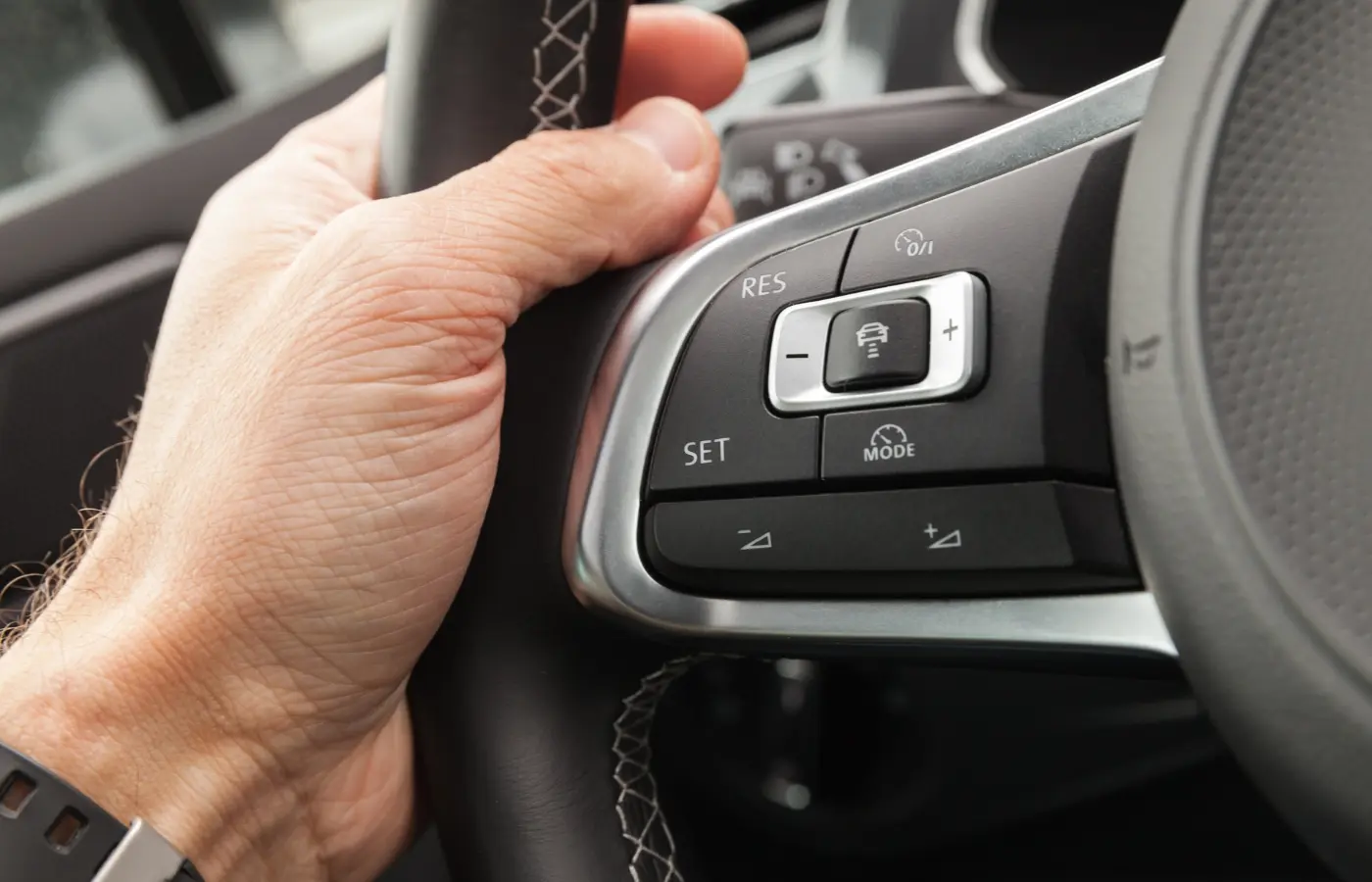
Using adaptive cruise control is simple once you know the flow: you turn it on, set a cruising speed, pick a following distance, and supervise while the system paces traffic. Controls vary by brand, but most use steering‑wheel buttons and familiar labels. Your inputs always win—pressing the brake or accelerator overrides—and many systems need a tap to resume after a full stop or won’t operate below roughly 25 mph.
- Activate ACC: Press Cruise/ACC ON, then SET when you reach your desired speed. Watch for the cruise icon to confirm.
- Adjust speed: Use +/– buttons to fine‑tune in small increments.
- Select gap: Cycle the distance/time‑gap button to choose short/medium/long. A longer setting is recommended for most driving.
- Override briefly: Press the accelerator to pass; release and ACC returns to pacing. Pressing the brake will cancel ACC.
- Pause/resume: Use CANCEL or the brake to pause; press RESUME to re‑engage. Some cars require a tap after stopping.
- Mind limits: Curves, hills, merges, and poor weather can affect detection. If sensors are obscured or traffic is erratic, take manual control.
Setting your following distance: understanding time gaps
Adaptive cruise control maintains space using a time gap, not car lengths. That means the cushion scales automatically: at higher speeds the car leaves more feet between you and the vehicle ahead, at lower speeds less. Most systems label the options as short/medium/long; choosing a longer setting is recommended for most driving because it gives you and the system more time to react and brake smoothly. A simple way to think about it is: following distance = your speed × selected time gap. Pick the gap that matches conditions—and stay ready to intervene.
- Highway cruising: Use medium or long for smoother pacing and fewer abrupt inputs.
- Stop‑and‑go: Favor a longer gap; some systems need a tap to resume after stopping.
- Curves or hills: Lengthen the gap or take manual control—detection can falter.
- Merging zones: Expect cut‑ins; keep a safe buffer and be ready for unexpected braking.
- Weather/visibility: Increase the gap or drive manually if sensors are obscured by rain, snow, fog, or glare.
Safety benefits and real-world limitations
Adaptive cruise control can support safer spacing and lower stress by automatically maintaining a time gap to the vehicle ahead. When used correctly, it encourages smoother driving and can reduce the temptation to speed on open roads. ACC also shares sensors with forward collision warning and, in many vehicles, works alongside automatic emergency braking. But it isn’t a crash‑avoidance guarantee. As the Insurance Institute for Highway Safety has noted, partial automation should be treated as a convenience feature—you still have to stay alert and ready to intervene.
-
Helps spacing: Maintains a driver‑selected gap to reduce tailgating and abrupt brake checks.
-
Reduces workload: Smooths throttle and braking to cut fatigue in traffic.
-
Discourages speeding: Holding a set pace can curb creeping speeds on long stretches.
-
Works with safety tech: Often paired with forward collision warnings and AEB sensors.
-
Field‑of‑view limits: On curves and over hills, ACC may miss or misidentify vehicles, leading to unexpected acceleration or braking.
-
Merging traffic: Fast cut‑ins can trigger abrupt braking or system disengagement.
-
Low‑speed constraints: Many systems disengage or require a manual tap below about 25 mph in heavy traffic.
-
Weather/visibility: Rain, snow, fog, sun glare, or a dirty sensor/camera can degrade performance—or disable the system.
-
Driver responsibility: It’s not self‑driving; you steer, supervise, and override when needed.
How ACC works with lane centering and automatic emergency braking
Adaptive cruise control plays best as part of a team. It manages your speed and following gap, lane centering helps keep the vehicle positioned between lane lines, and automatic emergency braking (AEB) is the backup when a collision seems imminent. All three typically share the same forward sensors (radar and/or cameras), but they serve different roles. Used together, they can reduce workload in traffic and on the highway—without replacing the driver.
- Shared perception: Forward radar/cameras feed ACC, lane centering, and AEB to track vehicles, lane lines, and closing speeds.
- Division of labor: ACC handles throttle and light braking to maintain a time gap; lane centering provides gentle steering support; AEB applies heavier braking if a crash risk escalates.
- Cut‑ins and sudden stops: ACC will slow first; if the closing rate spikes, AEB can intervene with stronger braking and alerts.
- Traffic jam assist: When ACC is paired with lane centering at low speeds, it can follow a lead car and help keep the vehicle centered—but you must stay engaged.
- Know the limits: Poor markings, curves, hills, and bad weather can degrade both centering and ACC; always be ready to steer and brake.
Where ACC fits in driver-assistance levels (SAE)
In SAE International’s framework, adaptive cruise control is a driver-assistance feature—not self-driving. With ACC alone, the vehicle automates longitudinal control (speed and gap) while you steer and supervise—that’s Level 1 “Driver Assistance.” When ACC is paired with lane centering so the car simultaneously manages speed and steering, it moves to Level 2 “Partial Automation.” In both cases, the driver must stay alert, keep hands on the wheel, and be ready to brake or steer at any time.
- Level 1 (Driver Assistance): ACC or lane centering active—one function at a time.
- Level 2 (Partial Automation): ACC + lane centering active together; driver continuously monitors.
- Not self‑driving: Even at Level 2, you remain responsible for the driving task.
When to use ACC—and when to turn it off
Adaptive cruise control is at its best on clear highways with predictable traffic and good visibility. It takes over the pacing so you can focus more on the road ahead, but it’s still a convenience feature—you remain in charge. Know your system’s low‑speed behavior, because many ACC setups disengage or require a tap to resume below about 25 mph.
-
Use ACC when: You’re on limited‑access highways with light to moderate, steady traffic and clear sightlines.
-
Use ACC when: You’re cruising long distances and want smoother, less tiring speed control.
-
Use ACC when: Visibility is good and sensors are clean, and you can select a longer following gap.
-
Turn it off when: Curves or hills may hide traffic ahead and prompt unexpected acceleration or braking.
-
Turn it off when: Merging/weaving traffic causes abrupt cut‑ins the system may not anticipate.
-
Turn it off when: Heavy, slow traffic drops below your system’s operating range (often ~25 mph).
-
Turn it off when: Rain, snow, fog, sun glare, or dirty sensors/cameras degrade detection—or if the car displays a sensor warning.
Situations to watch for: curves, hills, merges, and heavy traffic
ACC’s “eyes” look straight ahead, so anything that bends the road, hides the lead car, or adds sudden cut‑ins can confuse it. That’s why you might feel unexpected acceleration when your system loses sight of the car you were following—or abrupt braking when a new vehicle pops into view. Knowing these blind spots keeps the feature helpful rather than surprising.
-
Curves: ACC can include vehicles in adjacent lanes or miss your lead car mid‑corner, causing unexpected slowdowns or speed‑ups. Consider lengthening the gap or maintaining speed manually until the road straightens.
-
Hills/crests: Going over a rise can hide traffic ahead; ACC may not “see” it and could accelerate. If visibility is limited, disengage and hold a safe speed until the terrain levels out.
-
Merging traffic: Cars entering your lane may be outside the sensor’s field of view, then appear suddenly, triggering hard braking or a system cancel. Monitor closely and be ready to take over.
-
Heavy/slow traffic: Many systems disengage below roughly 25 mph or require a tap to resume after stopping. Expect frequent cut‑ins; use a longer gap or drive manually if pacing becomes erratic.
Weather and visibility: rain, snow, fog, and sun glare
Bad weather and poor visibility can trip up adaptive cruise control because its sensors need a clear, contrasty view ahead. Cameras struggle with spray, darkness, and glare; lidar performance drops in rain and fog; and while radar is robust, snow, ice, or grime on the front fascia can still block it. In these conditions ACC may brake unexpectedly, fail to detect a lead vehicle, or display a “temporarily unavailable” message. Treat ACC as a convenience, not a guarantee, and be ready to take over.
- Keep sensors clear: Clean the windshield, camera area, and front fascia; defog/defrost and remove snow or ice.
- Increase your gap (or go manual): Lengthen the following distance, lower your set speed, or disengage ACC in heavy precipitation or dense fog.
- Expect glare effects: Low sun and wet pavement can blind cameras—stay alert for late detections or sudden braking.
- Heed warnings: If you see “sensor blocked” or behavior feels erratic, switch to manual control.
- Use visibility aids: Wipers, defrosters, and headlights improve sensor performance and your own view.
Common mistakes drivers make with ACC
Most frustrations with adaptive cruise control come from overtrust or misuse. ACC is a convenience feature that paces traffic; it isn’t autonomous. It looks straight ahead, can struggle with curves, hills, and heavy weather, and many systems have low‑speed quirks. Know what your car can and can’t do, keep your eyes up, and be ready to take over.
- Treating ACC like self‑driving: You still steer, supervise, and remain responsible.
- Choosing the shortest gap everywhere: Short gaps invite abrupt braking; a longer setting is recommended.
- Using it in poor visibility or with dirty sensors: Rain, snow, fog, glare, or grime degrade detection—or disable ACC.
- Relying on it on curves and hills: The system may miss or misidentify vehicles, causing unexpected speed changes.
- Ignoring low‑speed limits: Many ACC systems disengage or require a tap to resume below about 25 mph.
- Assuming it will handle merges cleanly: Cut‑ins can trigger hard braking or a shutdown—monitor and be ready.
- Overlooking warnings and prompts: “Sensor blocked” or “temporarily unavailable” means take manual control.
- Not learning the controls first: Practice SET/RESUME, gap adjustments, and overrides before highway use.
Maintenance and calibration after repairs or windshield replacements
Because ACC relies on precisely aimed sensors—radar typically behind the front fascia and cameras near the rearview mirror—any work around those areas can affect performance. A windshield replacement, front‑bumper repair, suspension/alignment changes, or even a minor front‑end tap can shift sensor aim. Signs of trouble include “sensor blocked/temporarily unavailable” messages, late detections, unexpected braking, or the system refusing to engage. After such work, follow your owner’s manual and service guidance—many automakers require inspection and calibration to restore proper ACC operation.
- Before repairs: Tell the shop your vehicle has ACC and where its sensors are located.
- After windshield work: Camera alignment may change; request calibration per manufacturer procedure.
- After front‑end repairs/alignment: Ask for a radar/camera check and a verification road test.
- Keep sensors clear: Clean the windshield area and front fascia; remove snow, ice, or grime.
- Post‑service check: In a safe, straight road test, set ACC, adjust the following gap, and confirm smooth, predictable pacing. If behavior seems off, return to the shop promptly.
Finding ACC on used cars: model years, trim levels, and brand names
If you’re shopping used, adaptive cruise control became far more common after 2017. By 2023, more than 60% of vehicles had ACC installed (nearly triple since 2017), and 89% of model lines offered it—often missing only on base trims. That means availability on late‑model used cars is strong, but you’ll want to confirm the exact trim or options package includes it.
Automakers market ACC under different names. Watch for these terms in listings and window stickers:
- Active cruise control
- Dynamic cruise control
- Radar cruise control
- Automatic cruise control
- Intelligent cruise control
On the car itself, look for a cruise button set plus a separate gap/distance button (often an icon showing a car with bars ahead) and a forward sensor behind the grille or a camera near the mirror. On a test drive, verify that it locks onto a lead vehicle, lets you adjust following distance, and ask about low‑speed behavior—many systems work down to roughly 25 mph and may require a tap to resume after a stop. Finally, confirm ACC is listed in the owner’s manual for that VIN and trim, not just “cruise control.”
Cost considerations: options, repairs, and insurance
Adaptive cruise control adds value, but it also adds costs. As a factory option, pricing ranges widely by feature set: sources cited by Car and Driver note basic ACC can start around $500, while full-featured suites often run $2,000–$2,500. On used cars, ACC is frequently bundled with upper trims or technology packages, so the real “cost” may be stepping up a trim—verify the feature is actually present so you’re paying for what you get. Keep in mind that sensors and calibrations can affect repair bills and timing after glass or front‑end work, and insurance rates depend more on a vehicle’s repair profile than on any single driver aid.
- New-car option pricing: Basic ACC from about $500; full suites often $2,000–$2,500.
- Used-car premiums: ACC is usually bundled—compare trims and confirm equipment.
- Windshield work: Camera recalibration is commonly required after replacement.
- Front-end repairs: Radar behind the fascia may need alignment and a verification road test.
- Minor bumps, bigger bills: Sensors hidden in the grille/bumper can raise repair costs.
- Keep sensors clean: Avoid “sensor blocked” warnings and unnecessary service visits.
- Insurance reality: Discounts aren’t guaranteed—ask your carrier how ACC and glass coverage affect your premium.
Test-drive checklist to evaluate ACC before you buy
A quick, structured drive tells you how well a car’s adaptive cruise control fits your daily routes. Use a safe, low‑stress loop with light traffic and good visibility, and bring the owner’s manual or ask the salesperson to walk through the settings with you.
- Confirm it’s equipped: Look for an ACC icon plus a separate gap/distance button (car with bars). Verify in the manual and settings.
- Spot the sensors: Camera near the rearview mirror; radar behind the grille. Make sure they’re clean and unobstructed.
- Engage on a straight road: Set ACC at a safe speed and confirm it locks onto a lead vehicle (cluster icon or graphic).
- Adjust the following gap: Cycle short/medium/long and note how spacing changes and how smoothly it brakes/accelerates.
- Practice overrides: Tap brake/CANCEL and try RESUME. Briefly press the accelerator to pass, then release.
- Test low‑speed behavior: In gentle traffic, follow down to a crawl/stop if safe. Note if it auto‑restarts or needs a tap, and any cutoff near ~25 mph.
- Try mild curves/crests: Watch for loss of the target or unexpected speed changes; be ready to take over.
- Check cut‑in response: Near an on‑ramp, observe how it reacts to a vehicle merging ahead.
- Evaluate pairing features: If available, turn on lane centering with ACC and verify clear alerts/hand‑on‑wheel prompts.
- Watch for warnings: Any “sensor blocked/temporarily unavailable” messages or erratic behavior? Ask about windshield/front‑end repairs and calibration records.
Pros and cons at a glance
Adaptive cruise control can make daily driving smoother and less tiring by pacing traffic for you. But like any driver-assistance feature, it has limits and demands your attention, especially on curves, hills, and in poor weather.
-
Pros:
- Automatic spacing: Maintains a driver‑selected following gap to the car ahead.
- Lower workload: Smooth throttle/braking reduces pedal fatigue in traffic.
- Helps curb speeding: Holding a set pace can temper creeping speeds.
- Works with safety tech: Shares sensors with forward collision warnings and AEB.
- Driver override: Brake/accelerator inputs instantly take priority.
-
Cons:
- Not self‑driving: You must steer, supervise, and be ready to intervene.
- Field‑of‑view limits: Curves, hills, and merges can cause missed or false targets.
- Low‑speed quirks: Many systems disengage or need a tap below ~25 mph.
- Weather sensitive: Rain, snow, fog, glare, or dirty sensors degrade performance.
- Calibration needs: Windshield/bumper repairs may require sensor alignment.
Conclusion
Adaptive cruise control is cruise control made smarter: it uses forward sensors to hold a safe time gap, easing pedal work on long stretches and busy commutes. Used correctly, it can smooth traffic pacing and reduce stress, but it’s still driver assistance—not self‑driving—and it has real limits on curves, hills, merges, and in poor weather. If you’re shopping used, verify the feature on the exact trim, learn the controls, test low‑speed behavior, and ask for calibration records after any windshield or front‑end work. Ready to try it yourself? Explore late‑model vehicles with ACC, schedule a no‑pressure test drive, and have our team walk you through settings and safety tips. We offer transparent shopping, financing options, and nationwide delivery. Start here: Certified AutoBrokers.