What Is Android Auto? Setup, Wireless, and Compatibility
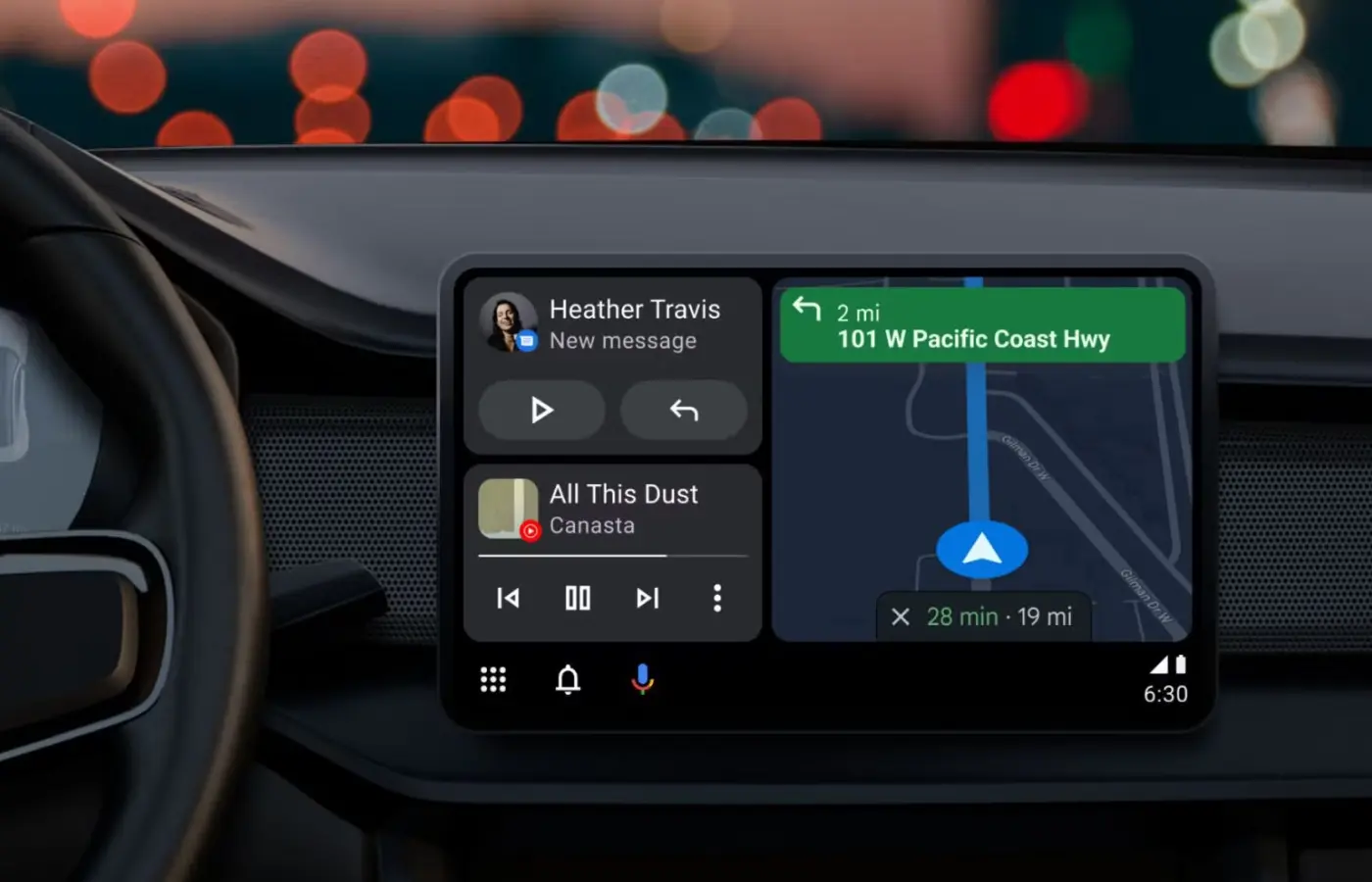
Android Auto is a free app that mirrors your Android phone on your car's display screen. It lets you control navigation, music, calls, and messages using your voice or touch while keeping your eyes on the road. Think of it as bringing your phone's most useful features to your dashboard in a safer, simpler format designed specifically for driving. No more fumbling with your phone at red lights or trying to read texts while merging onto the highway.
Click here to see our inventory equipped with Android Auto Connectivity
Whether you're setting up Android Auto for the first time or troubleshooting a connection, this guide covers everything you need. You'll learn how to download and install the app, connect it to your car both wired and wirelessly, and which phones and vehicles are compatible. We'll also walk through the key features and apps you can use while driving.
Why Android Auto matters for modern driving
Distracted driving causes thousands of deaths each year, with phone use being a major factor. Android Auto addresses this safety concern by integrating your phone's essential functions into your car's interface, so you can keep both hands on the wheel and your eyes forward. You don't need to glance down at your phone to check navigation or respond to an urgent message.
Safer than using your phone directly
When you use Android Auto, you control everything through voice commands or large, easy-to-tap buttons designed for in-car use. The system reads text messages aloud and lets you dictate responses without typing. Your navigation updates appear on the dashboard screen where you'd naturally look while driving, not down in your lap or cup holder.
Android Auto reduces the temptation to pick up your phone by bringing the most important features to your dashboard in a driver-friendly format.
Modern cars already support android auto, making it the standard for smartphone integration. You get access to your favorite apps like Google Maps, Spotify, and WhatsApp without the dangerous distraction of handling your device. The interface stays simple and uncluttered, showing only what you need for your current drive.
How to set up Android Auto in your car
Setting up android auto takes less than five minutes once you have the right equipment. The process works the same whether you're connecting to a factory-installed system or an aftermarket radio that supports the feature. You'll need your Android phone, a USB cable (for initial setup), and a car with a compatible display screen.
What you need before starting
Your phone must run Android 10 or higher to use Android Auto without downloading anything extra. The system comes pre-installed on these newer versions, so you can skip the app store entirely. If you're running Android 9, you'll need to download the Android Auto app from the Google Play Store first.
Check that your vehicle supports Android Auto by looking for the Android Auto icon on your infotainment screen or consulting your owner's manual. Most cars from 2016 onward include this feature, but older models may require an aftermarket stereo upgrade to get compatibility.
Connecting your phone for the first time
Start with your car in park and your phone unlocked. Plug your phone into the car's USB port using a quality cable (cheap cables often cause connection problems). The Android Auto setup screen should appear automatically on both your phone and car display.
Even if your car supports wireless Android Auto, you need to connect via USB cable the first time to complete the initial pairing process.
Follow the on-screen prompts on both devices to grant necessary permissions. You'll need to allow Android Auto to access your location, contacts, and microphone for full functionality. Accept the terms and conditions, then select Android Auto from your car's app menu. The entire process takes about three minutes, and your phone will automatically connect in the future when you enter your vehicle.
Understanding Android Auto features and apps
Android auto gives you access to your phone's most useful apps through a simplified interface built for driving. The system displays large icons and buttons you can tap easily while moving, and voice control lets you operate most functions without touching anything at all. You won't find every app from your phone here, only those specifically designed to work safely while driving.
Navigation apps keep you on track
Google Maps comes built into Android Auto and provides turn-by-turn directions with real-time traffic updates. You can search for destinations using voice commands, find nearby gas stations or restaurants, and save favorite locations for quick access. Waze and other navigation apps also work with the system, letting you choose your preferred mapping tool.
If you drive an electric vehicle, Android Auto shows charging station availability and plans routes based on your battery level. The system adjusts directions automatically when you encounter traffic or road closures, keeping you informed without requiring constant phone checking.
Music and entertainment on demand
Streaming apps like Spotify, YouTube Music, and Pandora integrate directly with Android Auto. You control playback through voice commands or touch, telling the system to play specific songs, artists, or playlists. Podcast apps including Google Podcasts and audiobook services like Audible also work while driving.
Android Auto automatically pauses your music when navigation announces a turn, then resumes playback so you never miss important directions or your favorite song.
Communication without distraction
You can make and receive phone calls through your car's speakers without touching your phone. Android Auto reads incoming text messages aloud and lets you dictate responses using Google Assistant. Messaging apps like WhatsApp, Facebook Messenger, and Signal all support hands-free operation, so you stay connected safely.
Android Auto wireless and wired connections
You can connect your phone to android auto either wirelessly or through a USB cable, depending on what your car and phone support. Both methods give you access to the same features and apps, but they work differently and each has specific advantages. The wireless option offers more convenience, while wired connections provide more reliable performance and charge your phone simultaneously.
Wireless Android Auto convenience
Wireless connections let you leave your phone in your pocket or bag when you get in the car. Your phone automatically connects to the system when you start the engine, and you can place it on a wireless charging pad if your vehicle has one. This setup requires a phone running Android 11 or higher and a car that supports wireless Android Auto, which most vehicles from 2020 onward include.
Wireless Android Auto eliminates cable clutter and connects automatically, but it drains your battery faster than a wired connection.
Battery drain happens because the system uses both Wi-Fi and Bluetooth simultaneously to maintain the connection. Your phone also generates more heat during wireless operation, which can affect performance on long trips in hot weather.
Wired connections for reliability
USB cable connections charge your phone while you drive, keeping your battery full for when you reach your destination. The wired setup works with any Android phone running version 9.0 or higher, giving you broader compatibility with older devices. Connection problems occur less frequently because you're not relying on wireless signals that can drop or interfere with each other.
Keep a high-quality USB cable in your car since cheap cables often fail to maintain a stable data connection. The cable plugs into your car's USB port (usually located near the dashboard or center console), and the connection establishes within seconds of plugging in.
Android Auto compatibility with phones and cars
Your phone and car both need to meet specific requirements before android auto will work. The compatibility depends on your Android version, the car's infotainment system, and whether you want wireless or wired connectivity. Most modern Android phones and vehicles from 2016 or newer support the feature, but checking your specific setup prevents frustration when you try to connect for the first time.
Phone requirements you need to know
Android phones running version 10 or higher come with Android Auto built in, so you don't need to download anything. Phones with Android 9 (Pie) require downloading the Android Auto app from the Google Play Store before you can connect. For wireless functionality, your device must run Android 11 or newer and support 5GHz Wi-Fi, which most phones from 2019 onward include.
Your phone also needs an active data connection (cellular or Wi-Fi) to use navigation, streaming, and other online features. Older or budget Android devices may struggle with performance even if they meet the minimum version requirements.
Not all Android phones support wireless Android Auto even if they run Android 11 or higher, so check your manufacturer's specifications before assuming wireless will work.
Which cars support Android Auto
Vehicles manufactured from 2016 onward typically include Android Auto support as standard equipment or an available option. You can verify compatibility by checking your owner's manual or the infotainment screen for the Android Auto logo. Most systems from brands like Honda, Toyota, Ford, and Chevrolet support both wired and wireless connections in newer models.
Aftermarket stereo systems from Pioneer, Sony, and Kenwood also offer Android Auto if your older vehicle lacks factory support. These units install in place of your original radio and cost between $300-$800 depending on screen size and features.
Ready to drive with Android Auto
Android Auto transforms your daily commute into a safer and more connected experience without the distraction of handling your phone. You now have everything you need to set up the system, whether you choose wireless convenience or the reliability of a wired connection. The features work seamlessly with your favorite apps while keeping your attention where it belongs: on the road ahead.
Your phone compatibility and vehicle support determine how quickly you can start using android auto today. Most modern cars include this technology as standard equipment, making the setup process straightforward even for first-time users. If you're shopping for a vehicle with modern tech features like Android Auto, browse our inventory of used cars in Grand Island, NY to find your perfect match with the latest connectivity options already built in.